
You can script my robot from your browser
- Robot Lab
- ABB
- Robotics
- Scripting
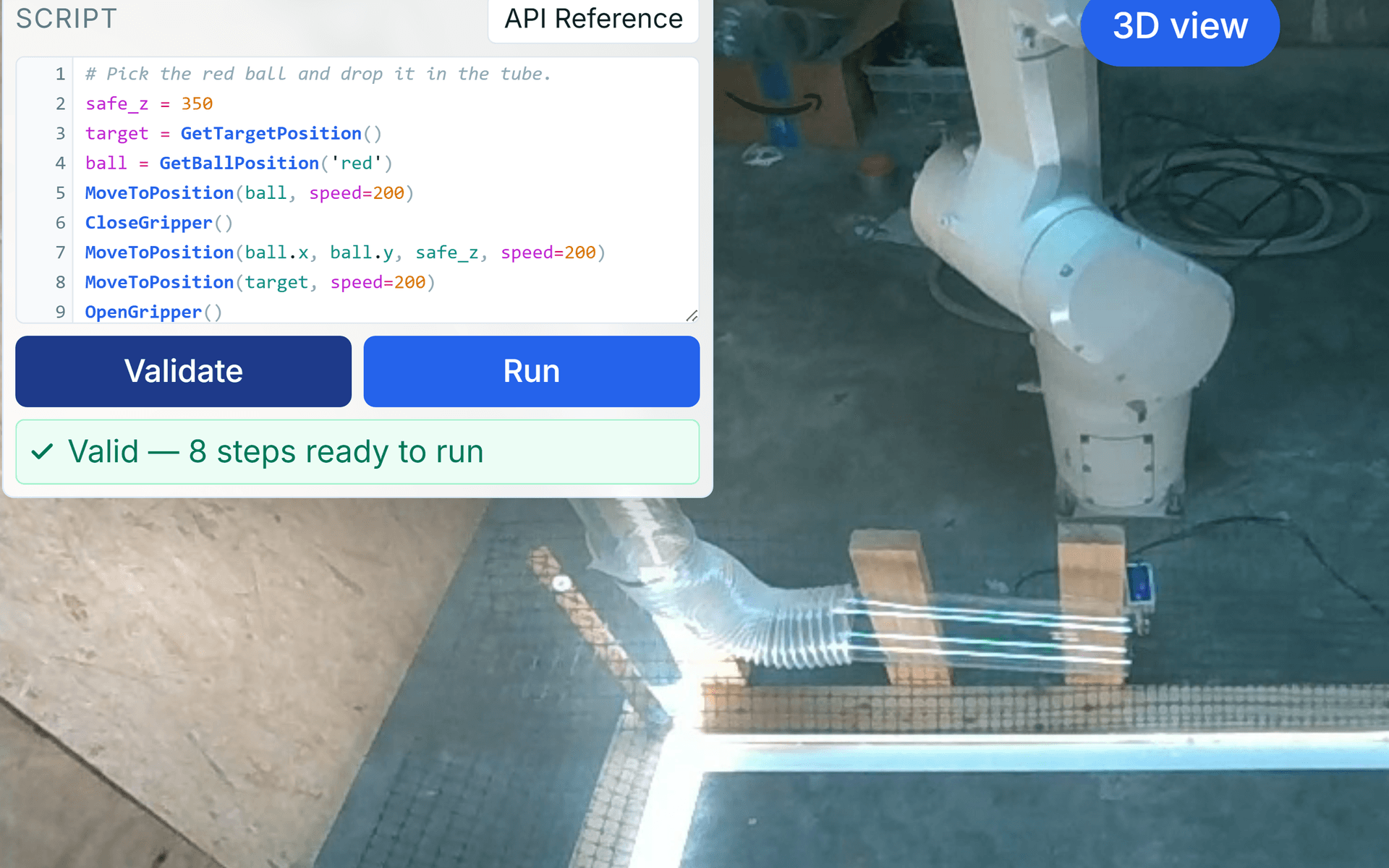
You can write a script in your browser and watch a real industrial robot run it, line by line.
That is Level 3 of my robot lab: robot.musserautomation.com — an ABB arm on an OmniCore controller in my shop, live video, no signup, no install. Open the editor, write a routine, hit Validate, hit Run.
# Pick the red ball and drop it in the tube.
safe_z = 350
target = GetTargetPosition()
ball = GetBallPosition('red')
MoveToPosition(ball, speed=200)
CloseGripper()
MoveToPosition(ball.x, ball.y, safe_z, speed=200)
MoveToPosition(target, speed=200)
OpenGripper()
That is the starter script the editor loads for you, and it is representative: nine lines to pick a ball off the floor and drop it down a tube, on hardware you have never seen and cannot touch.
The whole API
There is not much of it, on purpose. Five commands:
| Command | What it does |
|---|---|
Home() | Move to the home position, tool pointing straight down. |
MoveToPosition(x, y, z, speed?) | Move to a user-frame point in mm. speed is optional, in mm/s, capped at 500. It may be positional or a keyword, and you may pass a single position value instead of three components. |
OpenGripper() | Open the gripper, with a brief settle before the next command. |
CloseGripper() | Close the gripper, same settle. |
Wait(seconds) | Pause the script. |
And two functions that return a position you can store in a variable:
| Function | What it returns |
|---|---|
GetBallPosition(color) | The live user-frame position of the ball of that color. |
GetTargetPosition() | The user-frame position of the drop-off target. |
GetBallPosition is the one that makes scripting worth doing rather than just replaying
coordinates. It reads the live vision solution, so the script adapts to wherever the balls
actually are on the floor at the moment it runs. You can pass the position straight into
MoveToPosition, or read a component off it — MoveToPosition(pos.x, pos.y, pos.z + 100) to
stand off above a ball rather than driving into it.
What happens when you press Run
Validate parses. It tokenizes the script, checks that variables are defined before they are
used and that GetBallPosition() got exactly one string-literal color, strips comments, and
reports a step count — Valid — 8 steps ready to run. It is worth being precise about what that
is: a parse, not a reachability check and not a collision check. A script can validate cleanly and
still ask the arm to go somewhere it will refuse to go.
Run executes one step at a time. Instructions are sent individually and each one has to
complete before the next is dispatched, so the script advances at the speed of the machine rather
than the speed of the loop. A ▶ marker walks down the gutter as it goes. Wait() is
interruptible. If a command fails you get error on line X with the line that did it, which is
most of what you want from a debugger when the thing you are debugging is a robot arm.
The cell does not trust any of it. Speed is clamped to 500 mm/s in three independent places — in the browser, again in the hub that brokers the connection, and again in the backend that talks to the controller. The two that matter are the ones you cannot reach: a raw WebSocket that skips the browser entirely still gets clamped. The browser sends suggestions. The cell decides.
Most people never get this far
The lab has three levels. Level 1 is one-tap pick and place — PickClosestBall, PickBall,
ShowBall, drop it in the tube. Level 2 is manual control: jog the arm, move to exact XYZ, work
the gripper yourself. Level 3 is the editor.
In one 24-hour window this week, Level 1 saw 37 starts, Level 2 saw 24, and Level 3 saw 10. On
command adoption the same story: PickBall was used by 53% of the sessions that took control and
PickClosestBall by 52%.
That distribution is correct and I would not change it. Most people who open the lab want to see whether the thing on the other end is real, and one tap answers that faster than nine lines do. The one-tap layer is the front door.
But if you write control code for a living, Level 1 is not the interesting one. Level 3 is where you find out what it feels like to commission a machine you cannot walk up to.
Nobody has finished it
The Level 3 challenge is to script five balls into the tube in order: red, blue, blue, red, green. Ten people have opened that editor. None of them have completed the sequence.
Part of that is mine. The camera calibration regressed on August 3rd — I wrote about that yesterday — and color-specific picks are landing 20 to 100 mm off. A challenge built entirely on picking specific colors is exactly the challenge that defect breaks. Recalibration is next on the list, and until it happens the ordered sequence is harder than I designed it to be.
The rest is not a defect. Writing a routine for a machine you cannot reach out and nudge is genuinely harder than tapping a button. You have to think about standoff heights, about what the gripper is doing between two moves, about what happens if the ball is not where the vision system said it was. That is the actual job, and it is the reason the level exists.
One thing I would fix before you go looking for it: jog is still the one public command that winds joint 6. It pins base-frame orientation and lets the wrist counter-rotate, which is how I tore a gripper cable out of its socket last week. The fix is scoped, not yet written.
The editor is open: robot.musserautomation.com.