
Letting strangers drive an industrial robot
- Robot Lab
- Robotics
- ABB
- Safety
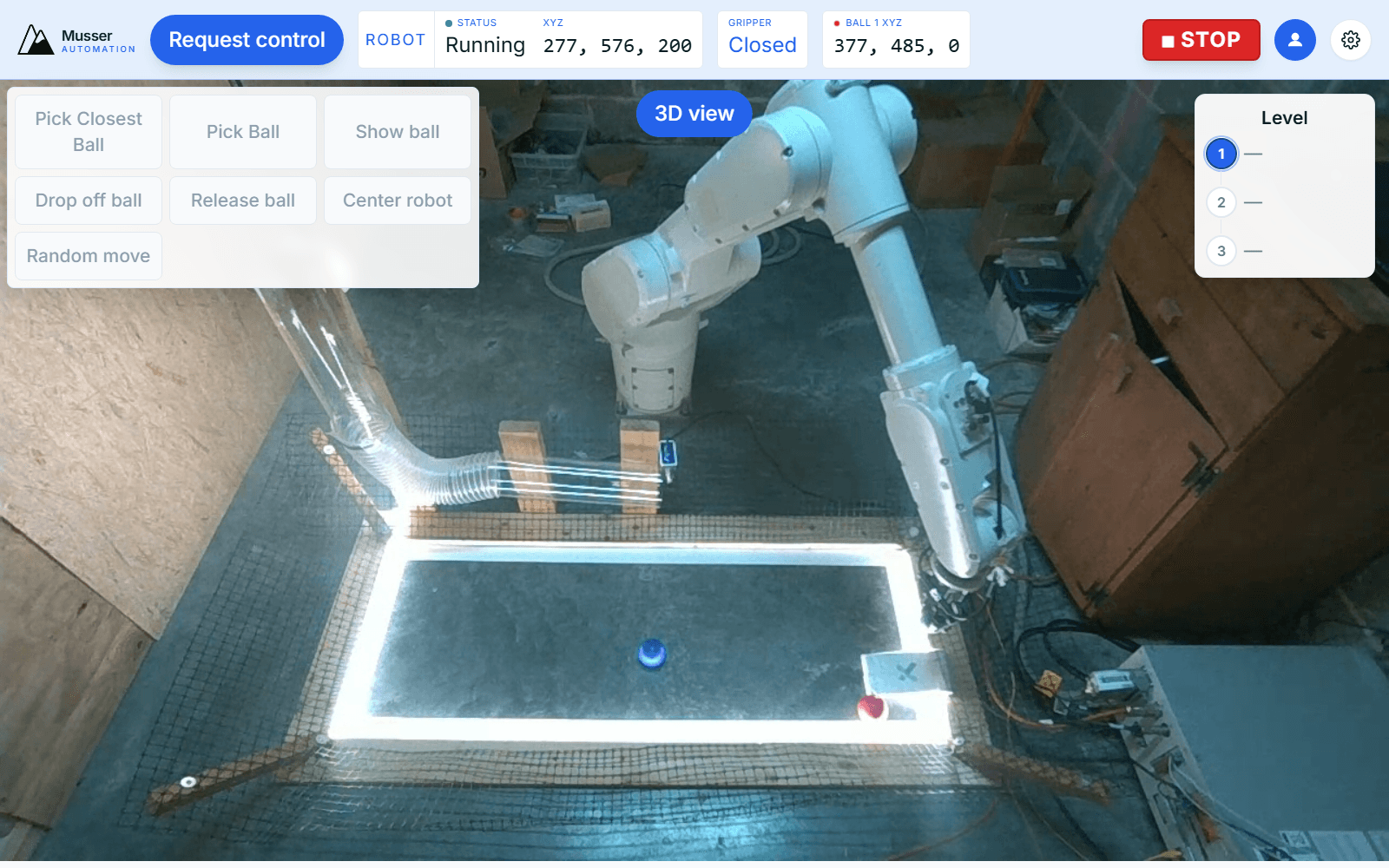
The Remote Robot Lab has been open for about a month now. People have driven it from outside my state, which was the moment it stopped being a demo and started being a service.
This post is the part I did not write last time: what is actually on the other end, and what it took to make it safe to hand the controls to someone I have never met.
What is on the other end
An ABB robot on an OmniCore controller, sitting in my shop. A gripper, three 60 mm balls in red, green and blue, and a tube to drop them into. A RealSense camera watches the arena and streams live video to your browser over WebRTC. There is a 3D digital twin you can toggle to if you would rather see the model than the machine.
Three levels of control, in increasing order of rope:
- Level 1 — one-tap buttons. Pick the closest ball, show it, drop it off, centre the robot.
- Level 2 — jog controls. Move in X, Y and Z in 10 mm steps.
- Level 3 — a script editor. You write
MoveToPositionandPickBallcalls and a real machine runs them.
The actual problem
The interesting engineering problem was never "let a person move the robot." Any HMI does that. It was "let a stranger move it" — someone with no training, no stake in the hardware, and in the worst case an active interest in breaking it.
So the cell does not trust the browser. Not in a paranoid way, in a structural way: the browser sends suggestions, and the cell decides.
Every command is validated server-side against a work envelope before it reaches the controller:
x: [600, 1000] mm
y: [-602, 600] mm
z: [238, 1068] mm
Speed is capped at 500 mm/s regardless of what the client asks for. Commands time out at 120 seconds. None of these limits live in the frontend — the frontend has its own copies for a responsive UI, but they are a convenience, not a control. Strip the JavaScript and you gain nothing.
The ball-release solenoid gets a heavier treatment, because a stuck-energized coil is one of the few ways a visitor could actually damage something. It is deadman-guarded twice: a backend loop that guarantees de-energize at a 10-second ceiling even if the calling process dies, and a passive deadman in the RAPID module sitting behind that. Two independent layers, on the assumption that the software above them will eventually fail.
The queue
Only one person drives at a time. The rest queue, first come first served.
The rule I am quietly happiest with: if you are the only one there, you keep the robot indefinitely. The ten-minute slice only starts counting down when somebody else asks for it. Nobody gets rotated out to make room for a queue that does not exist.
It would have been easier to run a flat timer on everyone. It also would have meant that at 2am, with nobody else online, the robot would kick you off mid-experiment for no reason. The timer exists to arbitrate contention, so it only runs when there is contention.
How your click reaches the robot
browser
  → WebSocket to a hub on AWS Lightsail
  → outbound tunnel opened FROM a mini PC in my shop
  → RWS 2.0 over HTTP into the OmniCore
  → PERS symbols picked up by a RAPID state machine
The direction of that third hop is the important one. The shop-side machine dials out to the hub and holds the connection open. Nothing in my shop accepts an inbound connection, and no visitor's traffic ever enters my home network. Video is separate — it goes straight out to LiveKit's SFU, so the camera stream never transits the control path either.
Commands are not streamed as motion. The backend writes PERS symbols into the controller
and polls busy / done / hasError until the RAPID state machine reports back. That
handshake is slower than streaming setpoints, and it is the right call over an internet
link: a dropped packet delays a command instead of stranding an arm mid-move.
The vision loop, and the bug that taught me something
OpenCV tracks the balls by HSV colour. That gives the twin something to render and the scoring system something to reason about.
Scoring is where it got interesting. The obvious implementation is to score a drop when the gripper opens near the target coordinate. That is what I built first, and it is wrong in a way that only shows up on real hardware: the arm passes back over the tube on its way to the next ball, and the ball sitting quietly in the tube gets scored again. And again.
The fix was to stop scoring the release and start scoring the result — a ball counts when it comes to rest in the drop zone, confirmed over several frames, inside a short window after an actual drop. Three passes to get right. The general lesson is one every controls engineer has learned the hard way: observe the outcome, not the command. The command is what you asked for. The outcome is what happened.
Adding LED lighting to the arena made the detection more reliable and simultaneously broke it, because specular highlights punched holes in the colour blobs and the newly-lit floor read as blue. Splitting blue from the floor by hue and closing the holes morphologically fixed it. Lighting is never free.
Go break it
It is a lab, so it will break sometimes. That is fine — I would rather it break with someone watching.
robot.musserautomation.com. No signup, no install. There is a feedback box, and it reaches me.